Google Operating System Unofficial news and tips about Google

  • Subscribe to our RSS feed.
  • Twitter
  • StumbleUpon
  • Reddit
  • Facebook
  • Digg

Tuesday, 6 May 2008

Share and Annotate Web Pages in Google Reader

Posted on 01:13 by Unknown
Google Reader's sharing feature was barely noticed when it was added, then it got more exposure when the shared items started to be broadcasted to Google Talk contacts and some sites aggregated shared posts. As Google Reader became more social, people discovered that it has some important limitations. "Have you ever wanted to share something that you were reading, but you didn't want to go through the hassle of subscribing to a whole feed for a single interesting article? And what about sharing content from sites with no feeds?, " asks Google Reader Blog.

Google Reader finally added an option to share any web page and to add notes for each shared item. Next to each post, there's a new action: share with note that can be used to explain why you found the post interesting or to add your comments. You can also go to the new Notes section to add a note or drag a bookmarklet to your browser's link bar so you can share any web pages, even if it doesn't have feeds.

Another improvement is that Google Reader shows small avatars next to each shared item and you can customize your public page by selecting a theme. But don't get to excited as the three themes that are available (ice cream, ninjas, sea) fail to impress and look terrible in Internet Explorer 7.
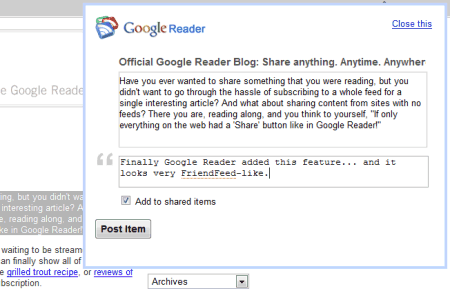


The new features are useful, but Google Reader didn't find a way to integrate discussions in the annotating feature, so you can reply to a comment. Even if it's not a feed reader, FriendFeed is a better place for sharing web pages and discussing them with the people you know or care about.

{ Thank you, Josh, Myo, Pascal. }

Later notes:
* you can't delete or edit notes
* there's no keyboard shortcut for "sharing with notes" the shortcut for "sharing with notes" is Shift-D because D is next to S on the keyboard and Shift-S is the shortcut for sharing
* when you share a post, Google Reader displays the full content of the post in an editable box. That means you can modify a post before sharing it. And that's not all: Google Reader shows the HTML code when you click on the editable box
* there's an overlap between this feature and services like Google Notebook or Google Shared Stuff.
Email ThisBlogThis!Share to XShare to FacebookShare to Pinterest
Posted in Google Reader | No comments
Newer Post Older Post Home
View mobile version

0 comments:

Post a Comment

Subscribe to: Post Comments (Atom)

Popular Posts

  • Interesting Ways to Use Google Chart API
    College @ Home lists 50 ways to use Google Chart API , a simple API for dynamically generating charts. Plot functions, visualize the evolut...
  • Gmail's Shortcut for Inserting Hyperlinks
    Less than 2% of the Gmail users have enabled keyboard shortcuts and actually use them, but that doesn't mean Google shouldn't impro...
  • Disable Google SearchWiki
    Google Search's preferences page includes the option to disable SearchWiki . Just click on the checkbox next to SearchWiki and you'...
  • Google Toolbar and 404 Error Pages
    I find it very strange that people have abnormal reactions when Google does something. People have an incorrect perception of the "don...
  • Gmail's People Widget Shows Recent Photo Attachments
    Gmail has never included an option to manage the attachments from the messages you've received. You can't see a list of PDFs receive...
  • Quickly Add a YouTube Video to a Playlist
    YouTube's embeddable player added a new feature that lets you quickly update your playlists with new videos. Click the arrow next to the...
  • Sync Google Chrome Bookmarks
    The most recent Google Chrome dev build added a feature that lets you synchronize your bookmarks with a Google account. Because of a techni...
  • Chrome OS, an Extended Google Chrome
    As previously anticipated , Chrome OS is a Linux distribution that includes a custom version of Chrome as the default browser. Google has re...
  • Search from YouTube's Player
    At the end of a video, YouTube's embedded player displays a list of related videos. If they're not very relevant or you have a speci...
  • Predictions for Google's 2009
    1. 10% market share for Google Chrome. 2. Google's search engine will lose a significant amount of market share as Live Search's pos...

Categories

  • Acquisitions (4)
  • Ads (20)
  • AJAX Search (1)
  • Android (20)
  • Annoyances (7)
  • API (11)
  • April Fools Day (6)
  • Blog Search (3)
  • Blogger (26)
  • Book Search (10)
  • Easter Egg (9)
  • FeedBurner (6)
  • Firefox extensions (11)
  • Froogle (5)
  • Gmail (156)
  • Google Analytics (10)
  • Google Apps (11)
  • Google Bookmarks (7)
  • Google Buzz (1)
  • Google Calendar (33)
  • Google Chrome (106)
  • Google Chrome OS (13)
  • Google Co-op (2)
  • Google Contacts (16)
  • Google Desktop (5)
  • Google Dictionary (5)
  • Google Docs (120)
  • Google Drive (9)
  • Google Earth (10)
  • Google Finance (3)
  • Google Gears (17)
  • Google Goggles (4)
  • Google Groups (6)
  • Google Health (4)
  • Google Instant (5)
  • Google Latitude (5)
  • Google Local (6)
  • Google Maps (67)
  • Google Music (10)
  • Google News (23)
  • Google Notebook (6)
  • Google Pack (5)
  • Google Phone (5)
  • Google Photos (1)
  • Google Play (4)
  • Google Plus (45)
  • Google Profiles (11)
  • Google Promos (2)
  • Google Reader (34)
  • Google Scholar (2)
  • Google Sites (7)
  • Google Suggest (20)
  • Google Talk (17)
  • Google Toolbar (21)
  • Google Translate (39)
  • Google Trends (8)
  • Google Update (8)
  • Google Video (20)
  • Google Voice (3)
  • Google Wave (5)
  • Greasemonkey (18)
  • iGoogle (33)
  • Image Search (47)
  • InOut (20)
  • Knowledge (7)
  • Mobile (77)
  • Music (5)
  • Nostalgia (7)
  • OneBox (18)
  • orkut (5)
  • Page Creator (3)
  • Picasa (4)
  • Picasa Web Albums (25)
  • PlusBox (1)
  • Security (9)
  • Social (56)
  • Software (4)
  • Spam (3)
  • Tips (57)
  • Universal Search (4)
  • User interface (82)
  • Visualization (11)
  • Voice Search (4)
  • Web History (3)
  • Web Search (220)
  • Webmasters (8)
  • Yahoo (8)
  • Yahoo Pipes (2)
  • YouTube (91)

Blog Archive

  • ►  2012 (72)
    • ►  April (5)
    • ►  March (22)
    • ►  February (20)
    • ►  January (25)
  • ►  2011 (428)
    • ►  December (28)
    • ►  November (40)
    • ►  October (37)
    • ►  September (31)
    • ►  August (41)
    • ►  July (42)
    • ►  June (48)
    • ►  May (33)
    • ►  April (26)
    • ►  March (38)
    • ►  February (34)
    • ►  January (30)
  • ►  2010 (16)
    • ►  January (16)
  • ►  2009 (479)
    • ►  December (35)
    • ►  November (35)
    • ►  October (38)
    • ►  September (43)
    • ►  August (34)
    • ►  July (33)
    • ►  June (40)
    • ►  May (47)
    • ►  April (47)
    • ►  March (46)
    • ►  February (37)
    • ►  January (44)
  • ▼  2008 (505)
    • ►  December (35)
    • ►  November (30)
    • ►  October (43)
    • ►  September (44)
    • ►  August (39)
    • ►  July (54)
    • ►  June (45)
    • ▼  May (51)
      • New Google Favicon
      • Gmail Labs?
      • Google App Engine, Open for Developers
      • orkut Themes
      • Google Earth Browser Plugin
      • Find the Font from a Logo
      • Google Street View Cars in Spain
      • Google Hosts Popular JavaScript Libraries
      • Google Shows Additional Information for Forums
      • Google Video's Player Detached from Search Results
      • The Importance of Being Included in Google's Index
      • Microsoft Thinks Short Term
      • Filter and Sort Tables from Web Pages
      • Google Anti-Malware Diagnostic Pages
      • TinEye - Upload an Image and Find It on the Web
      • Print Layout in Google Docs
      • Google Sites Available Without Google Apps
      • Future Updates for Google Image Search
      • Google News Layer for Google Earth
      • Videos Taken Down from YouTube
      • FeedBurner FeedFlare for Blogger Comments
      • Google China's Homepage in Mourning
      • Google Health Launches
      • Set Basic HTML as Default Gmail View
      • Product Images in Google Shopping OneBox
      • Google Doctype, an Encyclopedia for Web Developers
      • Google Spreadsheets Can Be Edited by Anyone
      • Use iGoogle and Google Reader in the Sidebar
      • Google Shows Blurred Faces in Street View to Prote...
      • Google Maps Adds Real Estate Search
      • Spreading OpenSocial Across the Web
      • Tips for Linking to Google Presentations
      • Yahoo Search's Differential Features
      • Reorder iGoogle Tabs
      • Using Google's N-Gram Corpus
      • Picasa's Hello Discontinued
      • Google Plastic Bag View
      • Google Translate Becomes the Best Free Online Tran...
      • Explore Places in Google Maps
      • Increase Font Size in Google Reader
      • Display Google Talk Presence
      • Google Maps Facelift
      • Share and Annotate Web Pages in Google Reader
      • Google OneBox for Premier League (and Other Sports...
      • Monitor Google's Homepage with Page2RSS
      • A Conversation About Google, Microsoft and Yahoo
      • Customize Google Docs Forms
      • Leaving Google: From Big to Small
      • iGoogle, a More Profitable Google Homepage
      • Google for iPhone, Widely Available
      • Download Google's Help Files
    • ►  April (63)
    • ►  March (64)
    • ►  February (37)
Powered by Blogger.

About Me

Unknown
View my complete profile